
n8n Flow
These days, as everyone starts experimenting with AI, there are a variety of approaches for building so-called agents through simple interfaces. Zapier, Pipedream, string.com, and n8n are among the most popular platforms.
Why
Yesterday, I had my first idea for a meaningful use of this technology: Effortless note-taking on the go. I use Obsidian as my note-taking tool, and until now the process of getting notes from my phone to my hard drive was rather cumbersome.
Concept
The idea is a bit of a “roundabout” solution:
-
Capture notes using braintoss
- Braintoss allows you to send a text, image, or audio recording to a predefined email address with just two taps. The relevant data is in an attachment to the email..
-
Use n8n to receive the attachment
- This is why Zapier wasn’t an option for me: with the free plan, you don’t get decent access to email attachments. 🙄
-
Send the content to ChatGPT for enrichment
- Especially when I save an image, I want a description and some keywords so I can find it again later.
-
Format the AI response with n8n
- Obsidian requires Markdown, and my vault expects certain frontmatter fields (≈ metadata).
-
Upload it to a private GitHub repo
- This is the “roundabout” part: How do I get the note, which is now floating around online, onto my hard drive?
- Dropbox could work, but requires a special developer account for API access. Which I don’t have.
- I do have a GitHub account.
- And there’s a plugin for Obsidian that syncs a vault with a repository.
-
Pull it into my vault with the Git plugin.
- And there you are.
The Workflow
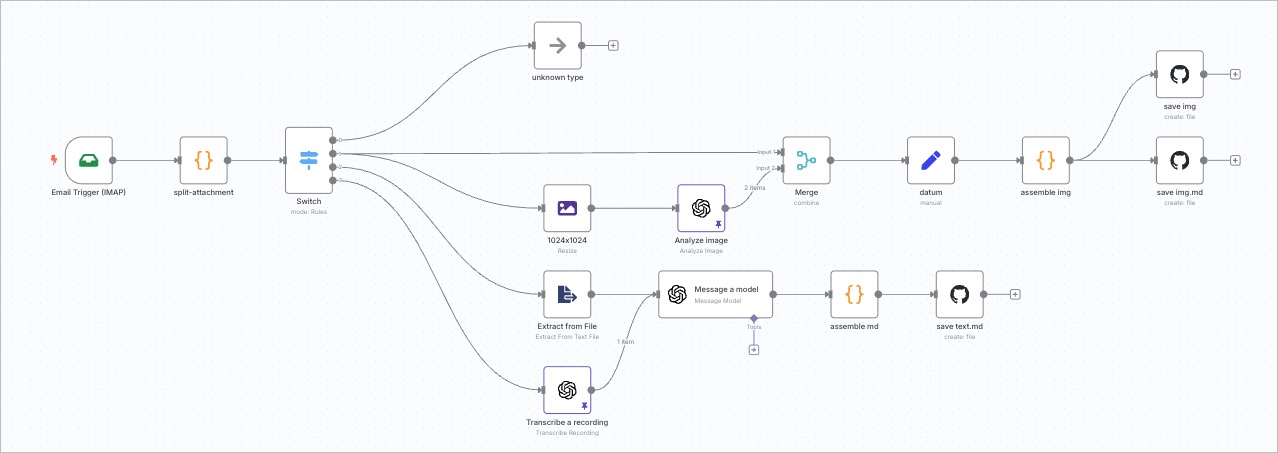
This diagram shows the described steps from left to right:
-
Receive the email
-
Extract attachments (delete the rest)
-
Branch based on attachment type:
- Downscale image
- Extract text from
.txt - Transcribe
.mp3
-
Send result to ChatGPT
-
Use a script to convert the response into Markdown
-
Push to GitHub
One of the Problems
My experience with workflow systems is largely based on Enfocus Switch, in which I’ve built hundreds of flows. But as usual, every new technology brings surprising and seemingly insurmountable problems.
Any workflow system is built on the idea that something “flows.” In Switch, it’s physical files being moved from folder to folder, with Switch maintaining a job ticket for any metadata in the background.
In n8n, the flowing "thing" is a JSON object carrying item info, passing from node to node. My problem in this workflow: the “Analyze Image” node overwrites the JSON with a new one containing only the AI response. So how do you preserve the info collected before?
Luckily, I had solved exactly this issue in Switch last year: you duplicate the job and then merge the two job tickets afterward (as seen in the teal “merge” node in the screenshot).