
Find concave hull in Illustrator
Today, I was replaced by an AI for the first time.
Imagine a document with lots of point-, path- and frame- texts. For an interactive application where any text needs to be highlightable, a path needs to be generated around each text.
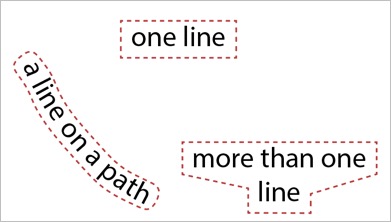
For single- and multi-line text, you can simply use the bounding box – it’s fast, good enough, and the AI handled scripting that easily.
It gets more complicated with text on a path. The AI managed a convex hull, but a concave hull seemed too complex.
And in my experience so far, this is one of the issues AI still has to solve: thinking outside the box.
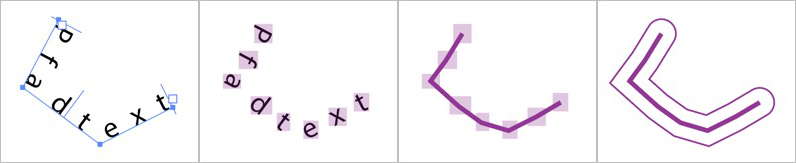
If we already have the bounding boxes of each letter (which we do after createOutlines), we can construct a polygon passing through the centers of those boxes, set the stroke width to the diagonal of the bounding box, and create outlines.
The result is a bit jagged for highly curved paths, but with some smoothing applied you get a pleasing result.